
Hex Dominant Meshing Tool

The Hex Dominant Meshing Tool is custom software I developed to generate hexahedral-dominant finite element meshes from both STEP and STL/OBJ files. I created it after encountering limitations with existing free tools like GMSH and NETGEN, which often struggled with more complex geometries featuring fillets or intricate details. I also enjoyed the challenge of producing meshes primarily composed of hex elements, which offer significant advantages over tetrahedral meshes in terms of accuracy, convergence, and simulation quality.
This is still a work in progress. I finished version 2 which addresses several issues in version 1 but there are many improvements I still need to work on.
Key Features
- Generates hex-dominant meshes for complex CAD models
- Improves accuracy and convergence for FE simulations
- Customizable meshing parameters
- Python/GUI-based implementation for ease of use
- Supports export to standard FE solver formats
Tutorial for Meshing Tool (Version 1)
This tutorial provides an overview of version 1 of the Hex Dominant Meshing Tool, highlighting its workflow, key features, and example meshes. While functional, this version had several limitations that have been addressed in the updated release. Notably, some hex elements exhibited poor quality, including skewed volumes, unfavorable aspect ratios, and warpage. In the new version, these elements are automatically converted to tetrahedra if necessary to ensure mesh integrity. Additionally, version 1 did not optimize the mesh by combining elements into larger hex blocks where possible, a capability now included to reduce overall element count and improve simulation efficiency.
Click on the video below to see the tutorial in action.
If the video does not display, click here to watch on YouTube.
Meshing Tool Version 2
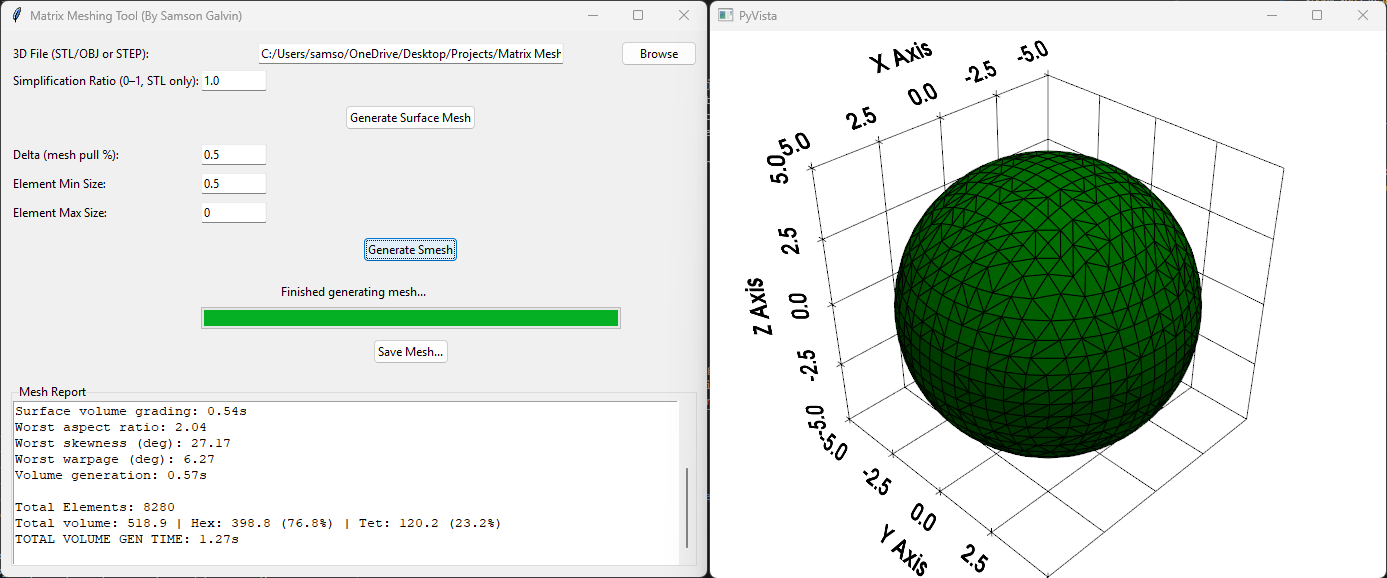
Version 2 introduces several improvements over version 1, including better avoidance of bad hex elements, automated element combination to reduce element count,
PDF Overview
Version 2 introduces several improvements over version 1, including better avoidance of bad hex elements, automated element combination to reduce element count, automatic suggested element min size, and a report after meshing to show mesh quality metrics.
Additional Resources
Source code, tutorial videos, and example meshes available for download upon request.